
PS5 HDMI Port Not Working? Get It Fixed in OKC
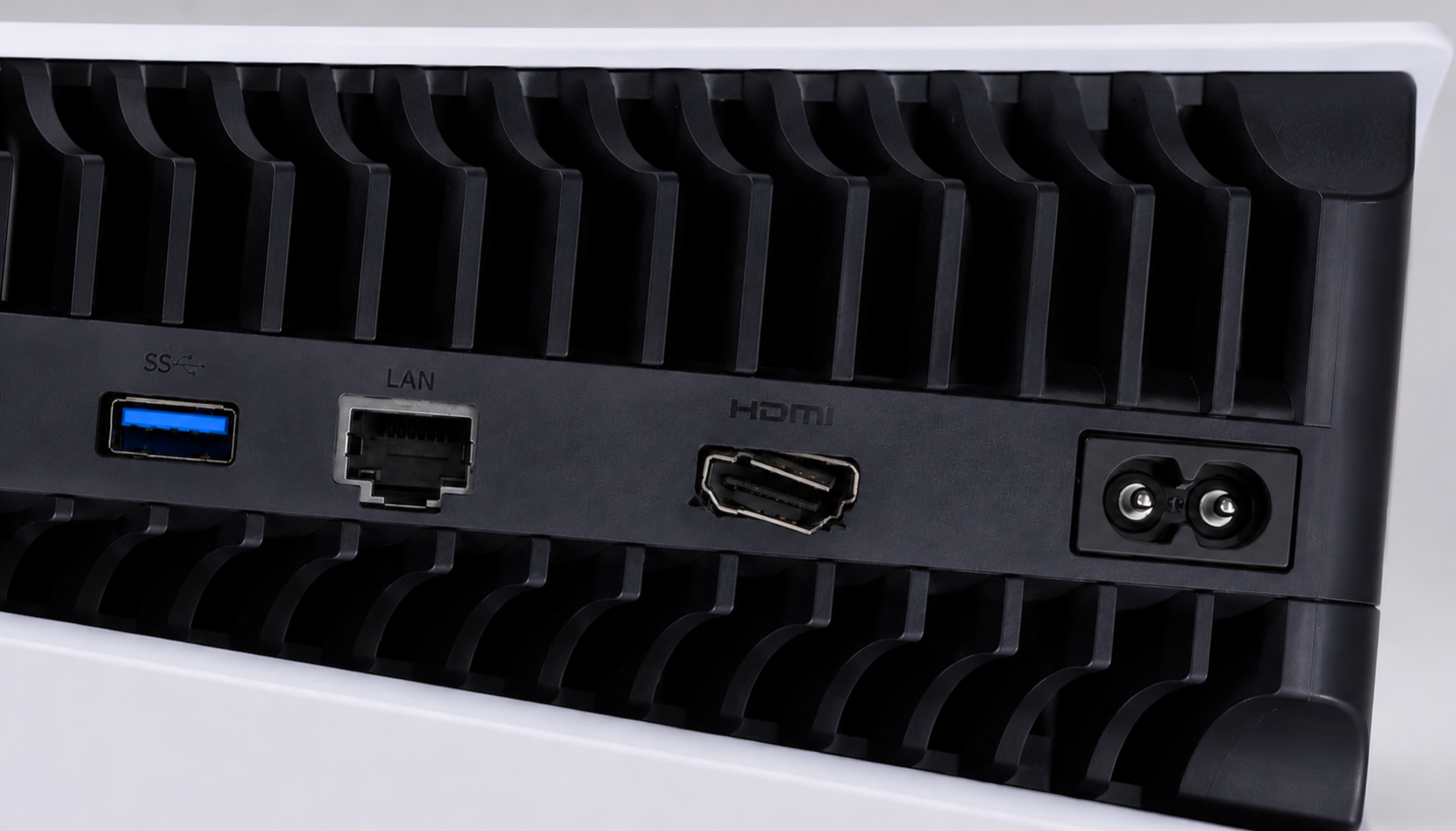
You finally have a few hours of free time, you boot up your PlayStation 5, and instead of the familiar home screen, you are greeted with a frustrating "No Signal" message on your TV. If you have already tried swapping cables and resetting your console to no avail, you are likely dealing with one of the most common hardware failures in modern gaming: a broken PS5 HDMI port.
If your PS5 HDMI port is not working, you are not alone. At Wireless Solutions & Accessories (WSA), game console repair is one of our most requested services, and the PS5 HDMI port is by far the most frequent culprit. Whether you are dealing with a completely black screen, flickering video, or visibly bent pins inside the port, we have the tools and expertise to get you back in the game.
In this guide, we will explore why the PS5 HDMI port is so fragile, how to troubleshoot the issue at home, and why WSA is your best choice for fast, reliable game console repair in OKC, Norman, and Midwest City.
Why Do PS5 HDMI Ports Break So Easily?
The HDMI port on the PlayStation 5 is notoriously delicate. Unlike older consoles that could withstand years of abuse, the PS5's port is highly susceptible to physical and electrical damage. Repair technicians across the industry have noted that this specific component is a frequent point of failure. Here are the primary reasons why your PS5 HDMI port might have stopped working:
1. Physical Damage and Bent Pins
The most common cause of a broken HDMI port is physical stress. The PS5 HDMI connector features tiny, fragile pins inside the socket. If you accidentally plug the cable in upside down, insert it at a harsh angle, or pull the console forward while the cable is still attached, those pins can easily bend or snap. Even moving the console from the living room to a bedroom without carefully unplugging the cable first can exert enough force to break the internal solder joints connecting the port to the motherboard.
2. Wear and Tear from Frequent Unplugging
If you frequently travel with your PS5 or move it between different TVs, the constant plugging and unplugging will eventually wear down the port. Over time, the friction weakens the metal casing and the internal connections, leading to a loose port that requires the cable to be held at a specific angle just to get a signal.
3. Electrical Surges and Cheap Cables
Not all damage is physical. Sometimes, a power surge from a lightning storm or a faulty TV can travel through the HDMI cable and fry the port or the HDMI retimer chip on the PS5 motherboard. Furthermore, using cheap, uncertified HDMI cables or heavy right-angle adapters can cause micro-arcs or put unnecessary weight on the port, eventually leading to failure.
How to Troubleshoot a PS5 "No Signal" Issue
Before you bring your console in for a repair, it is worth doing a quick check at home to ensure the HDMI port is actually the problem. Sometimes, a "No Signal" issue can be resolved without opening the console.
•Inspect the Port with a Flashlight: Shine a light into the back of your PS5. Look closely at the HDMI port. If the black plastic piece inside is missing, pushed back, or if you see shiny metal pins bent out of place, the port is physically broken and requires professional repair.
•Try a Different HDMI Cable: HDMI cables can go bad. Swap your current cable for a known working one (preferably an official HDMI 2.1 cable) to rule out a faulty cord.
•Test a Different TV or Monitor: Connect your PS5 to another display. If it works on the second TV, the issue might be with the HDMI port on your original television, not the console.
•Boot into Safe Mode: Turn the PS5 completely off. Press and hold the power button until you hear a second beep (about seven seconds). If the console boots into Safe Mode and displays an image, the HDMI port is likely fine, and you may just need to adjust your video output settings or update the system software.
If you have tried all these steps and your screen is still black, or if you can clearly see physical damage inside the port, it is time to seek professional help.
Why You Should Not Attempt a DIY PS5 HDMI Repair
With countless DIY tutorials available online, it can be tempting to try fixing the HDMI port yourself to save a few dollars. However, replacing a PS5 HDMI port is not a simple plug-and-play fix.
The HDMI port is soldered directly onto the PS5's motherboard. Removing the broken port and installing a new one requires advanced micro-soldering skills, a high-powered microscope, and specialized hot air rework stations. If you attempt this repair with a standard soldering iron, you risk tearing the microscopic copper traces off the motherboard, destroying nearby surface-mount components, or burning out the delicate HDMI retimer chip.
A botched DIY attempt can turn a routine port replacement into a catastrophic failure, effectively bricking your console. It is always safer and more cost-effective to trust a professional.
Expert Game Console Repair in OKC, Norman, and Midwest City
When your PS5 goes down, you need a repair shop that understands the intricacies of modern gaming hardware. At Wireless Solutions & Accessories, we specialize in comprehensive game console repair, including PlayStation, Xbox, and Nintendo devices.
Here is why gamers across the Oklahoma City metro trust WSA with their consoles:
•Expert Micro-Soldering: Our technicians are highly trained in the micro-soldering techniques required to safely remove and replace the PS5 HDMI port. We use high-quality, reinforced replacement ports to ensure the repair lasts longer than the factory original.
•Comprehensive Console Care: While we have the console open, we can also perform a deep cleaning and thermal paste replacement. The PS5 is prone to dust buildup, and a deep clean will keep your console running cool and quiet, preventing overheating issues down the road.
•Fast Turnaround: We know you want to get back to gaming. We pride ourselves on offering fast and efficient services.
•Local and Affordable: Skip the hassle of mailing your console away for weeks. With convenient locations in OKC, Norman, and Midwest City, we offer affordable, transparent pricing right in your neighborhood.
Get Back in the Game with WSA
Do not let a broken HDMI port turn your expensive PlayStation 5 into a paperweight. If you are dealing with a black screen, bent pins, or a loose connection, the experts at Wireless Solutions & Accessories are here to help.
Beyond HDMI port repairs, we also handle power supply replacements, disc drive issues, and deep cleanings for all major consoles. Book a repair online today or stop by one of our convenient locations in OKC, Norman, or Midwest City for a free diagnostic. Let WSA fix your PS5 so you can get back to doing what you love!


